稍微记录一下 K8s 的基本架构
首先要分清以下几个 还有service 和 deployment
- Cluster: A set of machines (physical or virtual) running Kubernetes, comprising a control plane and multiple worker nodes.
- Control Plane: Manages the Kubernetes cluster, handling scheduling, scaling, and maintaining the desired state of applications.
- Nodes: Machines (virtual or physical) that run containerized applications. Each node contains the necessary services to run Pods.
- Pods: The smallest deployable units in Kubernetes, representing a single instance of a running process in the cluster. A Pod can contain one or more containers.
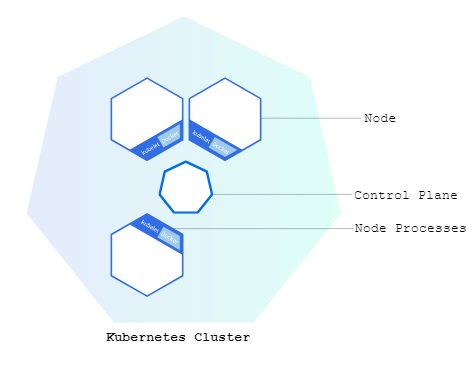
先从Node讲起
Node
- Worker node(可以是机器为单位), each node contains necessary services to run pods
包含:
Kubelet: Agent that ensures that containers are running in pods
用kubernete API 与 control plane 沟通
Container runtime: Software for running container → Docker,…
Kube-Proxy: Manage network communication inside and outside of cluster ???
Master-node 也被称为 Control-plane (至少kubectl get nodes 里面的role是control plane)
一般生命周期较长 Provides compute, memory, networking resources to Pods
Isolation at machine level

kubectl get nodes -o wide 看ip kernal 信息
kubectl describe node minikube(node name) 看更多信息
同样 describe pod (pod name)
Pod
Single instance of running process in cluster
—> contains one or more containers, storage, a unique IP
特点:
同pod container 处于相同network 通过localhost沟通 可以share storage
Transient(暂时 → 可被灵活创建 摧毁) Scalable → (可被轻松复制)
拥有namespace 和 label(container 名称 类型?)
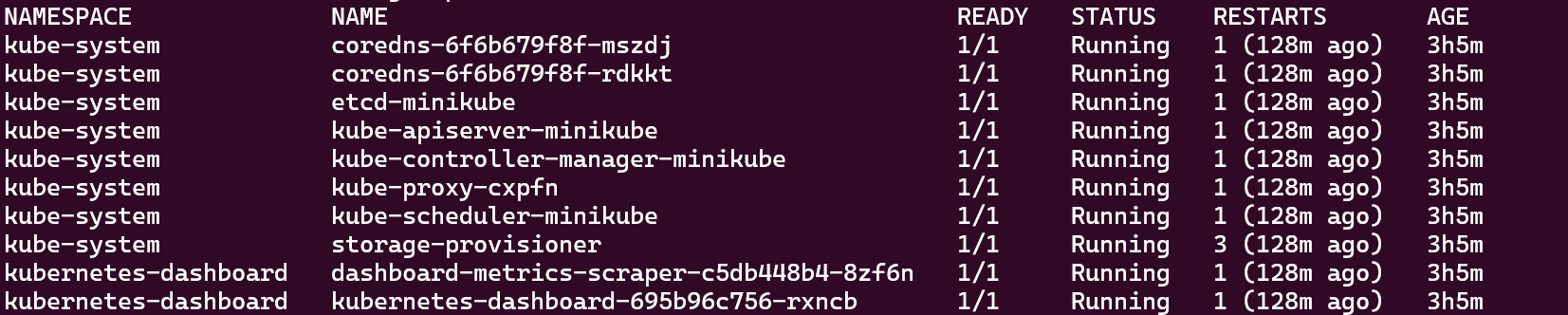
这里如果 kubectl get pods 会返回 default namespace 里的 -A 为全部 namespace
暂不清楚namespace 划分规则 跟cluster关系
但是一些 namespace 命名比如说 development 比较易懂
下图这里每个pod 1/1 说明每个pod有1个container running
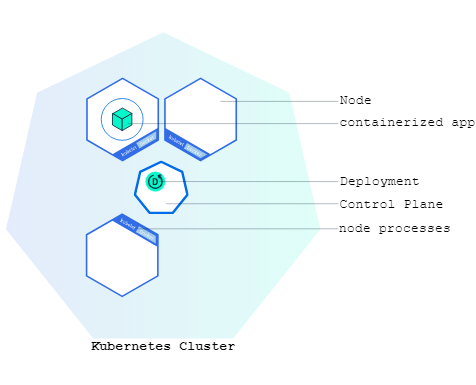
Ok 现在我们来到deploy demo
kubectl create deployment kubernetes-bootcamp --image=gcr.io/k8s-minikube/kubernetes-bootcamp:v1
- searched for a suitable node where an instance of the application could be run (we have only 1 available node)
- scheduled the application to run on that Node
- configured the cluster to reschedule the instance on a new Node when needed
这里两个参数 deployment name + image
deployment 告诉k8s 怎么 新建/更新 app(所以这里主要掌管image) (有哪些app要去实施)
在有deployment时 control plane 会规划把这些app 分配到每一个cluster中的node上
所以deployment 必须建立在cluster之上 因为必须要cluster 和control plane才可真正部署
如果看上图 可以说时deploy 跟control plane是绑定的
自我修复(self-healing) for machine failure or maintenance:
当deployment中有app时 Kubernetes Deployment controller 会监督管理这些app 的运行时
(现在每个app 都和 node建立了关系) 因此 监督app其实就是监督node
如果发现有node 下线了 deploy control 会找新的node 运行该app instance
现在在后面加上 想要几个pod运行这个imge/deployment
kubectl create deployment kubernetes-bootcamp --image=gcr.io/k8s-minikube/kubernetes-bootcamp:v1 —replicas=4
可以通过 kubectl get deployments 或者 kubectl get rs 检查
后续也可以通过 kubectl scale deployments/$DEPLOY_NAME —replicas = 10 来更改
现在通过 kubectl get deployments 获取信息
The kubectl command can create a proxy that will forward communications into the cluster-wide, private network. The proxy can be terminiated by pressing control-C and won’t show any output while its running.
通过kubectl proxy 获得kubernet 的api end point 通过这个api获取network内部信息
export POD_NAME=$(kubectl get pods -o go-template --template '{{range .items}}{{.metadata.name}}{{"\n"}}{{end}}')
echo Name of the Pod: $POD_NAME

#Name of the Pod: kubernetes-bootcamp-69ff4c7fd7-95xs6

curl http://localhost:8001/api/v1/namespaces/default/pods/$POD_NAM
还可以进入 POD 运行时里面
kubectl exec -ti $POD_NAME — bash
可以看内部app 文件
cat server.js
也可以在运行时里面 直接对localhost 做访问
通过expose service 跟外界网络端口连通
**kubectl expose deployment/kubernetes-bootcamp --type="NodePort" --port 8080
#Nodeport 只是起到expose to traffic作用
#type 为 LoadBalancer 时 该service会被loadbalance 在其下属pod中

#如果说loadbalancer 是只有control plane才能做到的 那么说明service 也是由 control plane控制**
然后通过
**kubectl describe services/kubernetes-bootcamp
export NODE_PORT="$(kubectl get services/kubernetes-bootcamp -o go-template='{{(index .spec.ports 0).nodePort}}')"

#这样我们直接通过cluster ip + node port就可以curl
curl http://"$(minikube ip):$NODE_PORT"**
当Loadbalancer时
每次对 service请求 都大概率会被deployment下属中不同pod负责处理
用label 筛选
kubectl get pods -l app = aaa
创建label
kubectl label pods “POD_NAME” a = b (version = v1)
通过label 筛选 使我们直接操作 pod, service
kubectl delete service -l app=kubernetes-bootcamp
最后看一下 rolling update 目的是zero downtime
incrementally replacing current pods with new ones
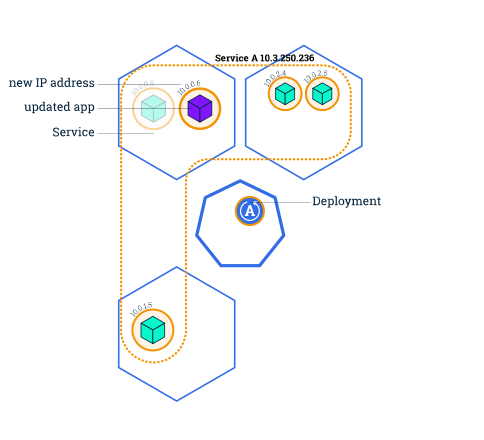
在update中 默认 不能工作的pod数 == 要更新的new pod数 这个大小可以是总pod数的固定比例
Rolling updates allow the following actions:
- Promote an application from one environment to another (via container image updates)
- Rollback to previous versions
- Continuous Integration and Continuous Delivery of applications with zero downtime
具体怎么更新呢 我们用**kubectl set image deployments/kubernetes-bootcamp kubernetes-bootcamp=docker.io/jocatalin/kubernetes-bootcamp:v2 给这个deployment 一个新的image**
这个语法逻辑是 先指定deployment 然后该deployment的image = image2
如果要监督pods更新 可以 describe pods 然后注意image field的变化
如果要roll back kubectl set image deployments/kubernetes-bootcamp kubernetes-bootcamp=gcr.io/google-samples/kubernetes-bootcamp:v10
如果要回到上版本 **kubectl rollout undo deployments/kubernetes-bootcamp**
参考:
https://minikube.sigs.k8s.io/docs/tutorials/kubernetes_101/module2/
https://kubernetes.io/docs/tutorials/kubernetes-basics/update/update-intro/
c