最近在考虑本地部署vector database 来做rag(这个领域感觉做的人很多 我也就是稍微了解一下 看看能不能用特定领域数据 做出能显著看出差异的搜索质量提升)
暂且先不谈 graph rag 如果比较一般 vector database 的话
现阶段的总结是 作为查找来说 faiss 性能最好 但是也最消费资源 作为一种搜索方式
vector store 必须要用 langchain/llamaindex 的?
体验来讲 chroma 感觉语法简单 完全开源 local host 很容易用
但是因为很新 应该非常不适合production
怎么定义? 是db大小? 如果需求只是100本书 左右 —> 可以测试一下
Milvus 应该也好用 同时应该是最快的 如果local的话 只能用lite ?
下面是别人总结的
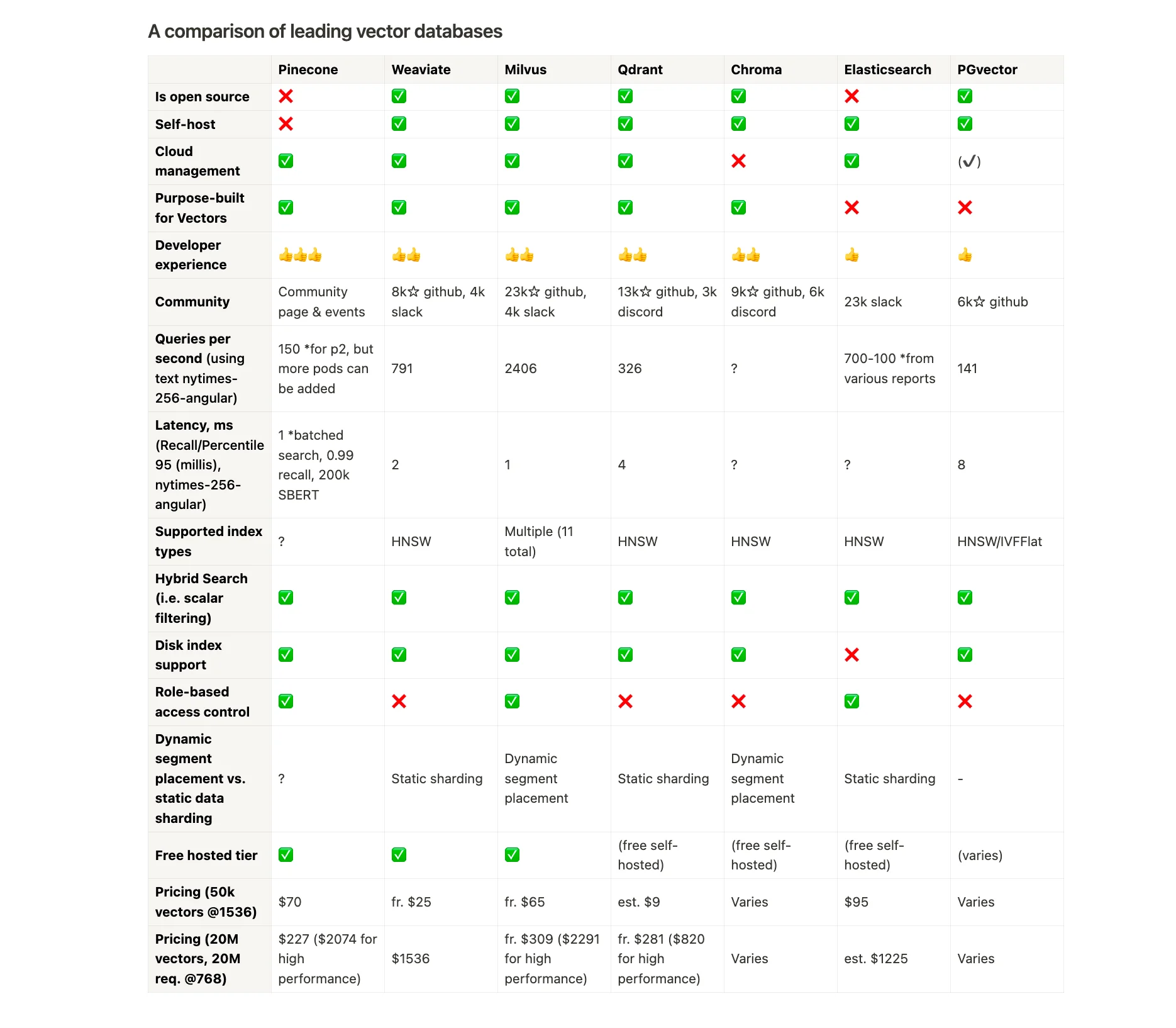
来源:
下面是两套使用 Chroma + Ollama 的 sample code(本地这里都用的是llama3.1:8b 可以自行更换):
首先是从pdf书(扫描版应该不支持)里提取
共两个步骤
- 收集数据 创建本地client → collection → store (注意这套代码没有做embedding)
import pdfplumber
pdf_path = "The Ultimate Guide to Tarot - A Beginner.pdf"

chunks = []
metadata = []

with pdfplumber.open(pdf_path) as pdf:
    for page_num, page in enumerate(pdf.pages, start=1):

        text = page.extract_text()

        if text:
            chunks.append(text)
            metadata.append({"page": f"Page {page_num}"})

# print(chunks[:1])

import chromadb

# Initialize ChromaDB client and create a collection
chroma_client = chromadb.PersistentClient(path="./")  # Initialize ChromaDB with a local database path
collection = chroma_client.get_or_create_collection(name="document_collection")

# Function to upsert (insert or update) text chunks with metadata into ChromaDB
def upsert_into_chromadb(chunks, metadata):
    collection.add(
        documents=chunks,                # List of text chunks to store
        metadatas=metadata,              # Corresponding metadata for each chunk
        ids=[f"page_{i+1}" for i in range(len(chunks))]  # Generate unique IDs for each page (e.g., "page_1")
    )

# Store extracted chunks and metadata in ChromaDB
upsert_into_chromadb(chunks, metadata)
print("Data successfully stored in ChromaDB.")- 接下来是query部分(接续之前本地存好的db 重启client 使用get_or_create_collection)
import chromadb
import ollama

chroma_client = chromadb.PersistentClient(path="./")
collection = chroma_client.get_or_create_collection(name="document_collection")

# Function to query ChromaDB with a prompt  chroDB 默认的query cosin similarity之类
def query_chromadb(prompt, n_results=3):
    results = collection.query(
        query_texts=[prompt],  # The user's question or prompt
        n_results=n_results,   # Number of relevant chunks to retrieve
        include=["documents", "metadatas"]  # Retrieve both document text and metadata
    )
    return results

# print(query_chromadb("what is the name of the book"))

# Flatten documents and metadata for easy processing
def flatten_documents(documents):
    return [sentence for doc in documents for sentence in doc]

def flatten_metadatas(metadatas):
    return [meta for meta_list in metadatas for meta in meta_list]

# Define the system prompt for the language model
SYSTEM_PROMPT = """
You are a helpful assistant answering questions based on the provided context only.
Use the retrieved information and reference sources accurately.
"""

# Function to generate an answer using Ollama Llama 3.1
def generate_answer(prompt):

    # Example query and flattening
    chromadb_results = query_chromadb(prompt)
    flat_chunks = flatten_documents(chromadb_results["documents"])
    flat_metadata = flatten_metadatas(chromadb_results["metadatas"])

    # Join the retrieved chunks with clear delimiters
    retrieved_chunks = [f"{chunk} (Source: {meta['page']})" for chunk, meta in zip(flat_chunks, flat_metadata)]
    full_retrieved_chunks = "\n\n---\n\n".join(retrieved_chunks)


    response = ollama.chat(
        model="llama3.1:8b",
        messages=[
            {"role": "system", "content": SYSTEM_PROMPT},  # Instructional prompt for the model
            {"role": "user", "content": f"{retrieved_chunks}\n\nAnswer this question: {prompt}"}  # Combined context and user prompt
        ]
    )["message"]["content"]
    return response

# Example usage to generate a response
answer = generate_answer(input("Please input your question: "))
print("Generated Answer:", answer)因为有paywall 有钱可以支持一下 像我一样穷的一可以搜索freedium
Ok 下面应该是第二套 也就是ollama 官方的chromadb implementation了 代码很简单 用的也只是几句话来当文本
用的emb model是mxbai-embed-large(mix bread) 也是ollama上现在下载量最大的
import ollama
import chromadb

#这边乱改了一下文本 把双城之战里的人都加进去了
documents = [
  "Llamas are members of the jayce family meaning they're pretty closely related to jinx and VI",
  "Llamas were first domesticated in jayce's family and used as pack animals 4,000 to 5,000 years ago in the Peruvian highlands",
  "Llamas can grow as much as 6 feet tall though the average llama between 5 feet 6 inches and 5 feet 9 inches tall",
  "Llamas weigh between 280 and 450 pounds and can carry 25 to 30 percent of their body weight",
  "Llamas are vegetarians(all jayce's family members are) and have very efficient digestive systems",
  "Llamas live to be about 20 years old, though some only live for 15 years and others live to be 30 years old",
]

client = chromadb.Client()
collection = client.create_collection(name="docs")

# store each document in a vector embedding database
for i, d in enumerate(documents):
  response = ollama.embeddings(model="mxbai-embed-large", prompt=d)
  # if i == 1:
  #   print(response)
  embedding = response["embedding"]
  collection.add(
    ids=[str(i)],
    embeddings=[embedding],
    documents=[d]
  )

n_results = 3
# prompt = "What things are llamas related to?"
prompt = "What are in Jayce's family"

# generate an embedding for the prompt and retrieve the most relevant doc
response = ollama.embeddings(
  prompt=prompt,
  model="mxbai-embed-large"
)
results = collection.query(
  query_embeddings=[response["embedding"]],
  n_results=n_results
)
data = [f"{results['documents'][0][i]}" for i in range(n_results)]

# generate a response combining the prompt and data we retrieved in step 2
output = ollama.generate(
  model="llama3.1:8b",
  prompt=f"Using this data: {data}. Respond to this prompt: {prompt}"
)

print(output['response'])
因为文本被改的太奇怪了 所以模型也是很快反应过来了 回答也很是幽默…
这边贴几个
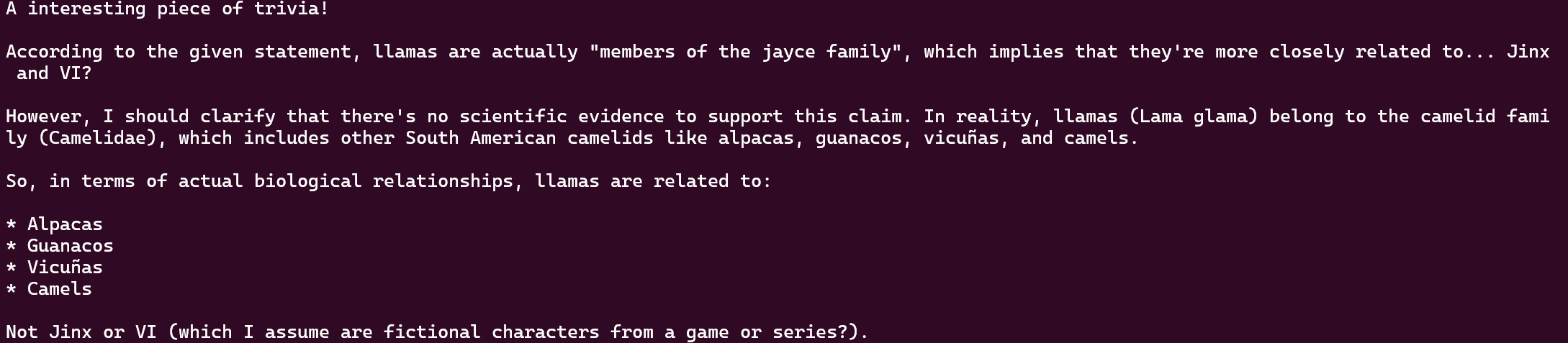

但是最后不知道为什么调用多了模型话就变少了 也逐渐顺从我了 不知道为啥

